
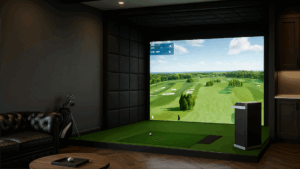
 Hey, golf warriors! If you caught our last post on nailing the perfect room size for your home simulator, you’re already one step ahead of the fairway. But space is just the canvas—now it’s time to load up the brushes. Turning basements into birdie factories and garages into glory grounds is the dream. Today, we’re breaking down the essentials you’ll need to assemble your setup: from enclosures that shield your shanks to launch monitors that read your soul. We’ll cover what each piece does, why it matters, and a realistic price range based on what we’ve seen in the field.Think of this as your shopping list for simulator nirvana. Budgets vary (we’ve done splashy $20K+ installs and scrappy $3K starters), but the goal is the same: A space where you can swing free, track data like a pro, and chase that elusive scratch handicap. Let’s dive in.
1. The Enclosure: Your Swing’s Safety Net and Stage
No enclosure? You’re basically hot-rodding in a kiddie pool—fun until it’s not. This is the frame that holds everything together, providing mounts for your impact screen, a buffer against those inevitable glancing shanks (hey, they happen to the best of us), and blackout panels to darken the area around the screen. That darkness? It’s non-negotiable for punchy, vibrant course visuals that make you feel like you’re at Pebble Beach, not your rec room.
- Options: Go kit-based for plug-and-play ease (think pre-fab frames from brands like Carl’s Place) or custom-built for that bespoke vibe—perfect if your space has funky angles or you want integrated shelving for clubs.
- Pro Tip: If you’re pinching pennies and skipping the projector/screen combo, a sturdy hitting net can sub in as a low-frills enclosure.
- Cost Breakdown:
TypePrice RangeBest ForHitting Net (Basic, No Screen)$200–$800Budget starters, outdoor vibesHigh-Quality Kit Enclosure$4,000+Most home setups—durable and versatileCustom-Built$5,000–$20,000+Luxury installs with bells and whistles
We’ve seen kits transform awkward corners into pro bays overnight. Invest here, and your setup lasts seasons, not swings.
2. The Impact Screen: The Heart of Immersion (and Impact)
This isn’t your grandma’s movie screen—it’s a battle-tested beast that catches your drives at 180 mph while projecting crystal-clear fairways. Skimp here, and you’ll get washed-out colors, poor spin readings (crucial for those iron approaches), and a screen that shreds after a few hundred buckets. Go premium, and it’s vibrant, responsive, and spin-savvy, giving you data that feels as real as Augusta turf.
- Why It Matters: Repeated punishment from hooks, slices, and bombs wears it down over time, so durability is king. Look for multi-layer weaves that handle the abuse without ghosting your graphics.
- Pro Tip: Pair it with a high-lumen projector (more on that below) for daytime play without dimming the lights.
- Cost Breakdown:
Quality LevelPrice RangePerksEntry-Level$300–$600Basic color, okay for casual hitsPremium (Recommended)$600–$1,200Vibrant hues, superior spin capture, long life
Trust us: That extra $600? It’s the difference between “meh” and “marvelous.” We’ve replaced too many bargain screens to count.
3. The Launch Monitor: Your Personal Caddie with a PhD in Physics
This wizard tracks ball speed, launch angle, spin rate—you name it—turning raw swings into actionable intel. Choose between camera-based (photonic magic for indoor precision) or radar-based (Doppler waves, ace for outdoors but workable inside). New hybrid tech blends both for the best of all worlds.
- Placement Lowdown:
- Radar: Behind you or overhead—great for longer mats but can need tweaks for lefties.
- Camera: Beside or overhead—overhead wins for seamless righty/lefty switches (no repositioning drama).
- Overhead Perk: Ideal for shared family bays, though it commands a premium.
- Pro Tip: Test compatibility with your software (e.g., GSPro or TGC) before buying. We’ve paired everything from budget cams to tour-level radar.
- Cost Breakdown:
TypePrice RangeSetup StyleFloor-Mounted (Camera/Radar)$2,500–$15,000+Versatile for most spacesOverhead Units$6,000–$18,000+Pro-level, hands-free perfection
Entry units like the Mevo+ get you started; sky’s the limit with SkyTrak or TrackMan elites.
4. The Computer: The Engine Under the Hood
Your launch monitor feeds data here, where software spins it into virtual St. Andrews. Sure, some monitors play nice with iPads for basics, but for buttery graphics, multiplayer modes, and course libraries? A beefy gaming PC is non-negotiable. Think high-end GPU (RTX 30-series or better), 16GB+ RAM, and a solid CPU to handle ray-tracing realism.
- Why Upgrade?: Laptops lag on big screens; desktops deliver frame rates that keep you immersed, not buffering.
- Pro Tip: We spec builds with quiet cooling—because who wants a jet engine in their zen zone?
- Cost Breakdown:
LevelPrice RangeHorsepowerBasic (iPad-Compatible)$1,000–$2,000Light sim software onlyGaming PC (Recommended)$2,500–$3,000+Full-course glory, future-proof
Most of our installs hover in that sweet $2,500 to $3000 spot—powerful enough for years of updates.
5. The Hitting Mat: Where the Rubber Meets the Divot
This isn’t Astroturf; it’s your stance foundation—a forgiving surface that accepts tees, cushions joints, and spans wide/deep enough for full setups (at least 5×5 feet). Look for fiber-built turf that mimics real lies without turning your swing into a chiropractor’s dream.
- Pro Tip: Gel inserts or shock-absorbing bases prevent wrist tweaks from concrete below.
- Cost Breakdown:
Size/QualityPrice RangeCoverageBasic Mat$300–$500Compact stances, no-frillsPremium (Recommended)$500–$1,200Tee-friendly, joint-loving expanse
A quality mat? It’s the unsung hero that keeps you swinging pain-free.
Finishing Touches: Turf, Tech, and Safeguards
With the core locked in, layer on green grass carpet ($200–$500) for that course-like feel—opt for seamless rolls to avoid trip hazards. Underfoot? Sectional rubber gym flooring ($3–$5/sq ft) absorbs errant shots and protects your subfloor. Don’t forget:
- Lighting: LED strips or recessed cans ($100–$300) for even, non-glare illumination—dimmable for night owls.
- Protections: Window screens, furniture bumpers, or corner guards ($50–$200) to shank-proof your space.
- Projector Add-On: If not bundled, a short-throw model adequate and tested for sim use (4,000+ lumens) runs $1800–$2,500 for wall-filling visuals. A 4K high-end 6000 lumin projector can run up to $4000.
Tee Up Your Build with the Pros
The Coastal Golf Studios Crew P.S. Black Friday sim deals are dropping soon—DM us for insider tips!